Showing posts with label learning online marketing. Show all posts

Friday, January 17, 2014

Time4Branding!

I was just looking at how companies build their diversified brands. I was looking at a company called Time4Learning that does educational homeschool software.  I noticed that they also have these sites
forwarded to their core Time4learning.com site.

There's Time4Reading.com and Time4Math.com which are both forwarded to pages on Time4Learning.com.

There's also a Time4Science.com which seems to be associated with a college science program.   And Time4Writing.com which is an affiliated writing educational program!

There are variations on Time4Learning.com. For instance, Time4Learning.net seems to be a community forum that supports Time4Learning.com.  There seems also to be TimeForLearning.com and TimeFourLearning.com both of which are forwarded to Time4Learning.com.  There's also Time4Learning.org which seems to just be a navigation list to Time4Learning.com.

I wonder if there is a:
Time4Spanish
Time4Spelling
Time4Vocabulary
Time4arithmetic
Time4marketing
Time4testing
Time4english
Time4business
Time4resting
Time4working
Time4Playing
time4geography
Time4History
Time4Chemistry
Time4algebra
Time4college
time4preschool
time4kindergarten
Time4highschool
etc

Tuesday, July 06, 2010

How many and which social media icons?

Here's a collection of what others are doing:

Squidoo.com- Notice that there is both a fb share and friend. 


V7N.com/ forum - Notice that their share list is kept to a small list.  The obscure ones are left hidden behind the More button.  This way, real users, can find the icons they want without getting discouraged.


T4L Plan - The top level list is good. Arguably, it should also have FB-like but maybe that would interrupt the flow of someone across the site.  The More (plus) button takes users to an unrefined list which needs to be refined.  The next step in design is to review what it tweets or shares as a message. Is it the same for every page? Does it take the page title? How does it work?

Thursday, September 25, 2008

Advertising sophistication

I was trying to set up business with a medium size CPM advertising network and in a phone conversation, he asked me: "Tell me about the demographics of your users."

I candidly and stupidly replied. I don't know much about them, I think they're mostly kids.

BONG. Wrong answer.

You should pretend to know something about your users to have some credibility. It's not really checkable information so there's really no wrong answer. And, grown-up users are more valuable than kids. So I got zero out of two on that little test.

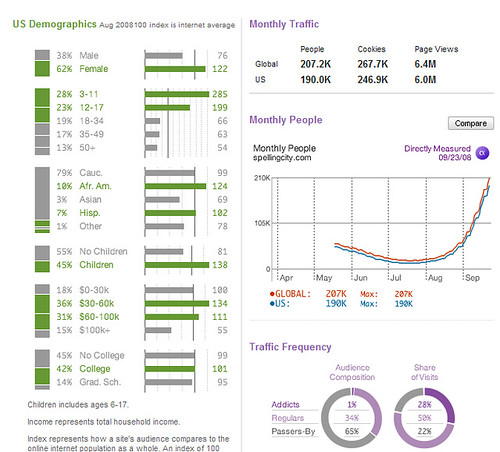
But how would I know about my user demographics? One, if your site is registered with a service, just repeat their information. It might be nonsence but it sure sounds good. So, for instance, for my SpellingCity.com site, I could say:

My site is 62% female, 49% over the age of 18, and 50% of the users are regulars. I get all this information directly from the Quantcast website. I'm not sure I believe it but this sort of info is the standard medium of advertising.

I'm also trying to understand how comscore with media metrix provides info so that I can better understand and characterize my site, and find appropriate advertisers. I was just reading through one of comScores PDFs which explains how to characterize your site and it baffled me.

Friday, May 30, 2008

Learning SEO - Keyword density....and other BS...

One of my colleagues, studying and learning about SEO, asked me about keyword density. He'd been speaking to an SEO expert who talked about his great results by focusing on 4.5% (or something) keyword density. He wanted to know what my opinion was.

My opinion is that it's bunk. Or at least, learning about and focusing on something like keyword density, is a million miles away from my understanding of and approach to placing well in the search engine. It's technical and finicky and dumb to interest.

I take the view that google has a constantly shifting algorithm. And to figure out what to do, start by trying to put yourself in google's shoes. How does Mr Google decide who to rank for a given term?

First, google looks for pages that are relevant which are pages that use that term alot. Say the term was "learning games", google starts by finding pages that talk about learning games. Specifically, gooogle considers (in this order);
- Do incoming links to that page use "learning games" as anchor text?
- Is the page's title: "learning games"?
- Is "learning games" in the URL, particularly in the domain name?

Then,
- are there H1 and H2 titles that are "learning games"?
- Are there at least a few uses of the term "learning games" on the page? Lets guess that google gives you top marks for this criteria if you have between 1% and 8% keyword density on the page. Below 1%, you might not really be about learning games. Above 8%, it's probably a stuffed spammy page.
- Do the links to your page come from pages that are full of learning games?
- Does your site in general have lots of learning games?
- Are other terms, that are statistically and semantically linked to learning games, such as "an educational game", showing up in on the page, on the domain, on the pages and domains from which your links come from, and on the pages that this page points to.

My point is this. For relevancy, there is no magic percentage that is better than another. The difference between a keyword density of 3.4% and 5.3% makes no logic as a focal point for google's ranking or for an SEO's effort. It might have worked but going forward, it can't be part of the plan.....

After finding some relevant pages, google then ranks them by links. They count the links. Do all links count and do they all count the same? That folks, is a story for another day

This is my $.02 on understanding and learning and educating myself about SEO. And my effort at promoting what I care about: learning, education, fun, and games. Like this one. Learning & teaching seo.

Digg!

del.icio.us

Friday, October 05, 2007

Starting a Green Business Online- free advice

I had breakfast with a friend who mentioned that his wife has started a great new business, importing a novel "green" product which I think should have strong appeal in the US marketplace. Being an overly enthusiastic techie, business-guy, and "save-the-earth" type, I gave him an earful of free unsolicited advice.

Here's the thoughts that I had.

1. Pick your domain very carefully and with an eye on search engine optimization, a second eye on people and their ability to correctly type in URLs, and a third eye on messaging (fortunately, the toxins in our environment means many of us have mutated to three eyed beasts). The choice of domains will do more to determine your search engine success and messaging than anything else. If you are Amazon, you can afford to educate the public who you are. Otherwise, pick a domain that has your keywords in it and which messages somehow. BTW - Time4Learning is only a partial success on this count. Say an A-. Some of my favorites sites and blogs in terms of naming are: Web-Home-School, Todays Learners, Learning Games for Kids, Reading Skills Pyramid, Parenting in an electronic age and SpellingCity .

2. Don't spend much money up front on a website. Instead, blog it. Install wordpress (it comes on many sites ready to install with a click) or use blogger (which can be positioned onto your domain easily). The process is simple. A - Pick and register your domain (I use namebargain.com or godaddy.com for this - under $10 and easy). B - Get some pictures and key messages and topics ready. C- have a webdesigner with blog experience and in 3 hours together, pick and install a template, customize it, and get trained on how to post. Be sure to get the mods on wordpress that make the page name & URL reflect your articles topic, not just the site name and some codes (This is key for SEO). In fact, I would just use blogger to avoid this complexity.

3. Write blog articles to cover the key issues. Fill in the profile with how you want to be contacted Don't use your home number - use a line that can be turned off!). Write a blog article with your pricing. Write another on product issues. Write another on Green stuff. Etc etc . Write articles on when you first got interested in the environment. Write about stylish clothes. Basically, write a post every few days. Or every day. Keep them short, professional, on or around the topic etc

4. Revisit the blog structure monthly. By this, I mean the menus and key message. Easy navigation to key sections is critical. To get a sense of this, look at how we keep moving these two blogs around. Karate at 50 and Moms Homeschooling. Nobody gets it right at first. Just adjust it slightly every month based on what you're learning.

5. Socialize and promote online. Alot. Find forums that are relevant and join them and participate. It's your signature line with your key message and a link that is your marketing. Find communities and blogs of people with similiar interests and get to know them. Write about them. Spend $1K on promotion getting people to blog about your products. Think about using the blog to market.

6. Once you get going, learn to track your traffic (thru your hoster or feedburner or google's webmaster tools or google analytics).

7. When you get going, learn to use the social bookmarks (technorati, delicious) and social networks (linked in, myspace, etc).

8 Keep building you understanding about keyword mechanics, SEO onpage issues, keyword volumes that are relevant to you, and the leading sites in your sectors.
Build relationships with them. I, for one, have an intimate relationship with the keyword "homeschool curriculum". I know who it likes best and why. I have relationships with the other leading sites. And homeschool curriculum likes me too!!!! ;->

9 Someday, build a regular website. Or don't. Blogs are flexible and powerful as content mgt systems that there's no reason to keep looking.

Tuesday, August 28, 2007

Site Stats for Blogger

Site statistics for my blogger blog have been a sore spot for me for a long time.

Today, problem solved!!!! :-> !!!!

I hooked up the site stats for blogger from feedburner (recently acquired by Google) and wow, I now know where the people are coming from.

Oddly, although this blog is brilliantly written, it gets little to no traffic - :-<
So I will now experiment by changing the name a little bit to see if that improves traffic. I just focused the name on the concept of learning online marketing, learning seo, and intermediate level seo. I'll see if that helps. I de-emphased online Q&A.....

Sunday, August 26, 2007

SEO Abbreviations Glossary

404 - page not found. Most sites redirect the user to a standard page when the requested page does not exist
504 - aredirect from one page to another (when the first page is obsoleted)
B2B - business to business
B2C - business to consumers
BOT - short for robot (an automated self-running process)
BLOG - short for weblog, also suggests a Better Listing On Google (Joke)
BTF - below the fold
CPA - cost per action
CPC - cost per click, or, cost per customer (a source of ongoing confusion)
CPM - cost per thousand views, a rate used for advertising and banner sales
CTR - click thru rate
CSV - common separated values, a data format often used for transport between systems
FAQs - frequently asked questions
FFA - free for all meaning anyone can add a link.
DMOZ - Directory MOZilla, the open directory project, a human edited directory that was a big deal in the 90s
DNS - domain naming service, the lookup system of table coorelating names (such as www.spellingcity.com with numerical IP addresses
GUI - graphical user interface
HTTP - hypertext transfer protocol, meaning the info to come is in HTML
HTTPS - secure/encrypted HTTP
HTML - the code used to write web pages - hypertext markup language
IBL - inbound links
IM - instant messaging
IP - Internet Protocol, usually used as short for "IP Address", each computer and router on the net has a unique numerical address such as 192.117.80
IT - information technology meaning computers and such
JPEG - an image format, joint photographers expert group
LTV - liftetime value of a customer
OBL - outbound links
PFI - pay for inclusion
PPC - pay per click
PR - Google PageRank (named for Larry Page punning on his name)
ROI - return on investment
SEM - search engine marketing
SE - search engine
SEO - search engine optimization
SERP - search engine results page
SQL - standard query language, an architecture/protocol common to modern databases
UI - user interface
URL - web address
WWW - world wide web, a great moniker to help people understand the internet. I wonder who coined the expression?
XML - eXtensible Markup Language, a new language augmenting HTML for better organizing data and meaning